Docu-Parts Generator for Doxygen
Overview
DXY Scripts
Generating Docu-Parts for Doxygen
Overview
Doxygen is a tool for writing software reference documentation. The reference-comments are written within code, and are relatively easy to keep up to date. Doxygen can cross reference documentation and code, so that the reader of a document can easily refer to the actual code.
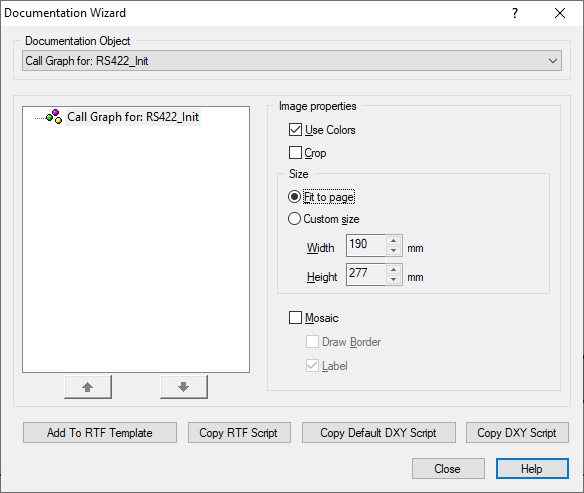
Docu-Parts Generator for Doxygen (DPG) help you to automatically regenerate graphics like Flowcharts, Call-Hierarchy and Type-Graphs. Scripts may be generated with DA-C Documentation Wizard, like in DA-C Automated Documentation generator (ADG). It's very simple, for example you choose one Flowchart, configure him with collapse and expand nodes and choose "Documentation > Wizard" menu, then "Copy DXY Script" and paste it in the DXY Script File.
Here are the DPG goals:
- Simple configuration
- Repeatability of generating
- Reusability of scriptsIn actual version DA-C supports Doxygen \image html command like
/*! Here is a snapshot of HardwareInit() function:
* \image html HardwareInit.jpg
*/
DXY Scripts
In one separate file "DXY Script File" you may define generating scripts for one graphic or for graphics of one group (Flowcharts, Call-Hierarchy Graphs, ...).. See Optios > Docu-Parts Generator for Doxygen
Documentation Wizard may generate the script for one graph for you (Buttons: "Copy Default DXY Script" and "Copy DXY Script").
// Flowchart for one function
[HardwareInit.jpg]
Job = GetFlowChart
Symbol = HardwareInit
File = Control\HrdwInit.c
Options = "B817ES3128112fV#B6$E2$O2#A$O6$OH$E8$O31$O6$OH$E1$O29$O5$OS"
// Default Non-Structured Flowchart for all functions that did not have "own" script
[FCGN_%TargetSymbol.jpg]
Job = GetFlowChart
Symbol = %TargetSymbol
File = %TargetFile
Options = "B217ES31281114V#B6"As you may see, graphics that need to be generated with general rules, must have a name prefix that shows which group of graphics they belong to.
Generating Docu-Parts for Doxygen
In menu "Documentation" you create new or open configured DXY Script File. Another possibilities are start Check or Generating from Docu-Parts for Doxygen.
New DXY Script File
Opens new DXY Script File in Editor. Another way is "File > New > Text > *.dxy" menu.
Open DXY Script File
Opens DXY Script File configured in "Options > Documentation Generator > DXY".
Check DXY Targets and Scripts
Project Source Files (usually *.c and *.h included in project) are parsed for occurrences of "\image html GraphicFile.ext" (here called Targets). DXY Script File (Configured in "Options > Documentation Generator > DXY") will be parsed for Scripts. With "Documentation > Check DXY Targets and Scripts..." you get error, warning and info messages for all Targets or Scripts usually.
Generate DXY Documentation Parts
It do the same as above but also generates, if possible, all defined Targets.

 Copyright © 1993-2022, RistanCASE PR