Generating an DXY Documentation Script with Wizard
Documentation Wizard
Wizard DXY example for Textual reports
Wizard DXY example for Graphical reports
Wizard DXY Example for Textual Reports
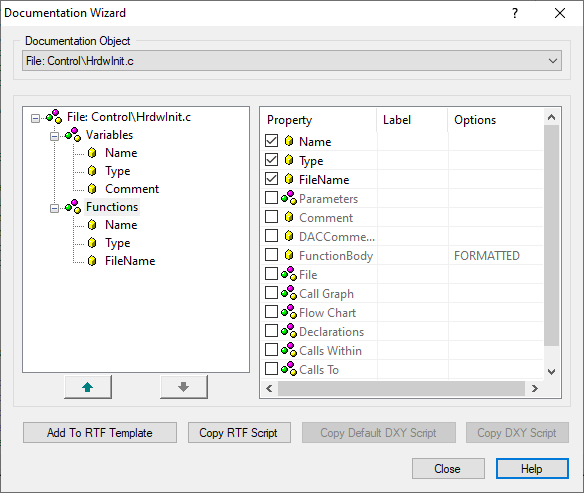
The documentation object is, at the same time, the root of the Wizard property tree. Every non expandable node in the property tree has a corresponding DGML type variable. These variables are, depending on their type, documented by their simple and composite properties. Simple properties are related to the information which cannot be further structurally decomposed, and for which the Wizard generates simple script which, in the generation process, produces information in the generated document. A composite property is the information which can be documented using several properties (simple or composite). For a composite property, as well as for the documentation object, the Wizard generates only the data retrieving script, which results in a corresponding DGML type variable. This means that the whole documentation is generated by simple property scripts, while data retrieving scripts only prepare data which are to be integrated into the generated document.
Above figure shows an example of the Wizard property tree. The function
HardwareInithas been chosen as the documentation object. It has been chosen that this function is to be documented by the simple property Name, and the composite properties Parameters and File. It has been chosen that the composite property Parameters will be documented by its simple property Type, and that the composite property File will be documented by its simple property ProjectName. On the basis of the property tree specified in this way, the Wizard will generate the following DGML script (without ordinal line numbers, which have been shown for the purposes of reference).1: #{ /* DG-Wizard generated block */ }#\
2: #{ GetFunction(TFunctionData, "HardwareInit", "Control\HrdwInit.c") }#\
3: #{ /* use TFunctionData */ }#\
4: #{ TFunctionData.Name }#
5: #{ for_each (TSymbolData1 in TFunctionData.Parameters) }#\
6: #{ /* use TSymbolData1 */ }#\
7: #{ TSymbolData1.Type }#
8: #{ end_for }#\
9: #{ GetFile(TFileData1, TFunctionData.FileName) }#\
10: #{ /* use TFileData1 */ }#\
11: #{ TFileData1.ProjectName }#
12: #{ /* end DG-Wizard generated block */ }#\Lines 1 and 12 of this script are comments which in the DT single out the script generated by the Wizard.
Lines 2 and 3 contain the data retrieving script of the documentation object - the function
HardwareInit. This script prepares the TFunction type variable TFunctionData.In line 4 there is the script generated for the simple property Name. In the generated document, this script creates the name of the function - that is,
HardwareInit.Lines 5,6 and 8 contain the data retrieving script for the composite property Parameters. Since Parameters is a collection, the Wizard has generated the
for_eachloop, and within the loop the variable TSymbolData1 is ready to be used. It is used by the simple property Type, on the basis of which line 7 is generated (#{ TSymbolData1.Type }#).Lines 9 and 10 represent the data retrieving script for the File property, which prepares the variable TFileData1 used by the script generated for the simple property ProjectName.
Wizard DXY Example for Graphical Reports
There are several graphic-type documentation objects:
Flowchart CallGraph TypeGraph Metrics
All graphic ODs have the same (simple) properties:
Use colors Mosaic Border Width Height
The general form of DGML scripts to be generated by the Wizard:
#{< DTMLscript(<image_variable_symbolic>) >}#
#{FormatColor(<image_variable_symbolic>, <color_param_string>) }#
#{FormatCrop(<image_variable_symbolic>, <crop_string>) }#
#{FormatAsMosaic(<image_variable_symbolic>, <dimensin_X>, <dimenssion_Y>) }#
#{FormatBorder(<image_variable_symbolic>, <border_param_string>) }#
#{begin_image(<image_variable_symbolic>)}# <WMF image> #{end_image}#where:
< DTMLscript(<image_variable_symbolic>) > - DGML script generated according to data in the table above,
<image_variable_symbolic> - output variable which identifies the generated graphic OD,
Format(...) - DGML scripts for formatting one or more figures. It is formed on the basis of properties Use Colors, Mosaic and Border.
#{begin_image(<image_variable_symbolic>)}# and #{end_image}# - limit the block connected to the figure. Everything within this block pertains to the figure with the reference ImageVar. You can find the DGML functions SegmentX() and SegmentY() here.
<WMF image> - place where the figure (the formed graphic report) is inserted in WMF (Windows Meta File) format. It is used only for formatting in DTE. During the generation phase, it will be replaced by the current graphic report.
 Copyright © 1993-2022, RistanCASE PR